
Download aMule – Free File Sharing & Peer to Peer Tool for Mac
Overview
aMule is a free, open‑source file‑sharing and peer‑to‑peer (P2P) client built especially for macOS users who want a reliable, feature‑rich alternative to commercial download managers. Developed by a dedicated community of volunteers, aMule brings the power of the classic eDonkey2000 and Kad networks to the modern Mac environment. The software’s primary goal is to make file sharing simple without compromising on security or performance.
Its clean, native‑looking interface lets you browse, search, download, and upload files with just a few clicks, while advanced users can dive into granular settings such as bandwidth throttling, source management, and custom search filters. aMule’s cross‑network compatibility ensures that you have access to a massive library of content, ranging from public domain media to niche software packages, all while staying within the legal bounds of your jurisdiction. Because it’s open source, the codebase is continuously audited by developers worldwide, providing an extra layer of trust compared with many proprietary P2P clients that may bundle unwanted adware or telemetry. Whether you’re a seasoned power user looking to fine‑tune your download queue or a casual Mac owner who simply wants a “set‑and‑forget” solution, aMule offers a balanced mix of simplicity and depth that makes it a compelling choice for anyone interested in decentralized file distribution.
Key Features & Benefits
- Multi‑Network Support: Seamlessly connects to both the eDonkey2000 and Kad (Kademlia) networks, expanding the pool of searchable files.
- Intuitive User Interface: Native macOS look and feel with drag‑and‑drop support, customizable columns, and a built‑in preview pane.
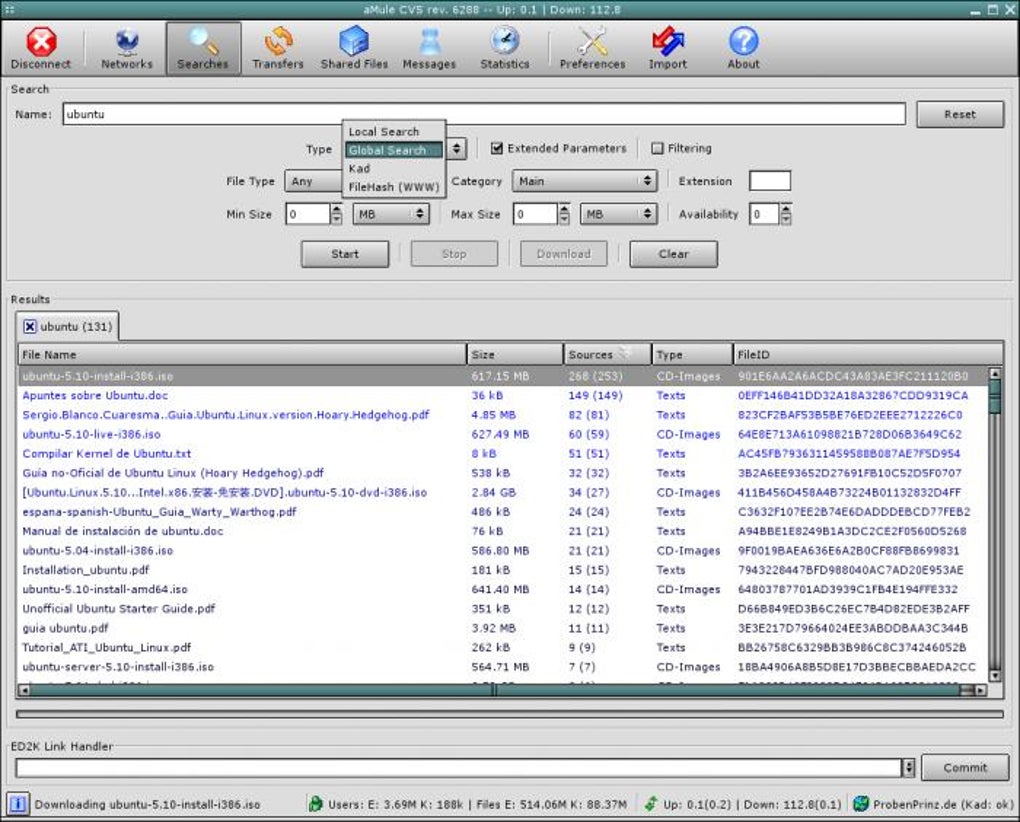
- Advanced Search Filters: Filter results by file type, size, source count, and keyword relevance, helping you find exactly what you need faster.
- Bandwidth Management: Set upload/download speed limits per file or globally, and schedule throttling to avoid network congestion during work hours.
- Integrated Chat System: Communicate with other peers directly from the client, request specific files, or negotiate source sharing.
- Secure Connections: Supports encrypted connections (ED2K over TLS) and can be configured to use VPN or proxy services for added privacy.
- Automatic Update Checker: Periodically checks for the latest stable releases and notifies you without interrupting ongoing transfers.
- Cross‑Platform Compatibility: While this review focuses on macOS, aMule is also available for Windows and Linux, enabling a consistent experience across devices.
- Extensible Plug‑in Architecture: Developers can create add‑ons for custom protocols, improved statistics, or integration with external media players.
- Low System Footprint: Optimized for modern Macs, aMule runs efficiently on both Intel and Apple Silicon chips, consuming minimal RAM and CPU when idle.
Why Those Features Matter
The combination of multi‑network support and powerful search filters eliminates the common frustration of “empty results” that many users encounter on single‑network clients. Bandwidth management is essential for users on limited internet plans; aMule lets you cap upload speeds so you don’t inadvertently hog upstream capacity, which can affect video calls or cloud backups. Security‑oriented features such as encrypted transfers and optional proxy usage address growing concerns about surveillance and ISP throttling. Moreover, the built‑in chat not only fosters community interaction but also serves a practical purpose—users can request rare files directly from knowledgeable peers, improving the overall health of the swarm. Finally, the low system footprint ensures that aMule can run silently in the background, syncing files while you focus on other tasks, a crucial advantage for power users who run multiple development or creative tools simultaneously.
Installation, Usage & Compatibility
Step‑by‑Step Installation Guide
Installing aMule on macOS is straightforward. First, visit the official aMule website or the trusted GitHub releases page to download the latest .dmg installer. Once the file is downloaded, double‑click the disk image to mount it, then drag the aMule icon into your /Applications folder. macOS may display a warning because the app is not from the App Store; simply right‑click the aMule icon, select “Open,” and confirm you want to run it. After launching, the program will prompt you to configure your network settings—choose either the default automatic mode or manually input a server list if you have preferred eDonkey servers. Finally, accept the license agreement and let aMule perform its initial network handshake, which typically takes a minute or two.
First‑Time Use and Basic Navigation
Upon opening aMule, you’ll see three main panes: the Search tab at the top, the Downloads list on the left, and the Sources & Queue pane on the right. To start a search, type a keyword in the search bar, select the desired network (eDonkey or Kad), and click “Search.” Results appear with columns for file name, size, sources, and rating. Double‑click a file to add it to the download queue.
The client automatically negotiates sources, begins downloading in chunks, and updates progress in real time. You can pause or resume any transfer by right‑clicking the entry and selecting the appropriate option. Uploads start automatically once you have completed a download, contributing back to the swarm and improving your “share ratio.”
Operating System Compatibility
aMule is compatible with macOS 10.13 (High Sierra) and later, including both Intel‑based Macs and Apple Silicon (M1, M2, and newer) devices. The application runs natively on Apple Silicon, thanks to a recent code refactor that eliminates the need for Rosetta translation, resulting in smoother performance and lower power consumption. Users on older macOS versions can still run aMule through Homebrew or MacPorts, though certain UI elements may appear slightly dated. The software also offers command‑line utilities for advanced scripting, useful for automation on macOS servers or headless environments.
Troubleshooting Common Issues
If you encounter connection problems, first verify that your firewall or router is not blocking ports 4662 (TCP) and 4672 (TCP), which are the default ports for eDonkey traffic. You can adjust these ports in the Preferences → Network section. For users behind strict NAT, enabling “UPnP” or manually forwarding ports often resolves connectivity hiccups. Another frequent issue is “No sources found”; this can be mitigated by adding more eDonkey servers or switching to the Kad network, which relies on distributed routing rather than central servers. Finally, if the client appears sluggish, check the “Bandwidth” tab to ensure you haven’t inadvertently capped your download speed to an extremely low value.
Pros, Cons & Frequently Asked Questions
Pros
- Completely free and open‑source—no hidden fees or ads.
- Supports both eDonkey and Kad networks for a massive content pool.
- Native macOS UI that feels familiar to Apple users.
- Advanced bandwidth and source management tools.
- Secure encrypted connections and optional proxy/VPN support.
- Low CPU and memory usage, even on older Mac models.
- Regular updates and active community support.
Cons
- Initial setup can be intimidating for complete beginners.
- Lacks integrated media playback; you must open files in external apps.
- Search results depend on network health; some files may be scarce.
- No built‑in torrent support—only eDonkey/Kad.
- Occasional UI glitches on macOS Big Sur and later (typically fixed in patches).
Frequently Asked Questions
Is aMule safe to use on macOS?
Yes. aMule is open‑source, meaning its code is publicly reviewed. It offers encrypted connections, and you can further protect your privacy by using a VPN or proxy. However, always respect copyright laws and avoid downloading illegal content.
Can I run aMule on Apple Silicon Macs?
Absolutely. Since version 2.3.0, aMule provides native Apple Silicon binaries, delivering better performance and lower power consumption compared to Rosetta translation.
Do I need to manually add eDonkey servers?
The default installation includes a curated list of reliable servers. You can add or remove servers in Preferences → Servers if you wish to customize your connections.
How does aMule handle uploads?
Once a download finishes, aMule automatically starts uploading the completed file to other peers, based on your bandwidth settings. You can pause or limit uploads at any time via the “Upload” tab.
Is there a mobile version of aMule?
No official mobile client exists, but you can use remote‑control tools or third‑party apps that interface with aMule’s web API to monitor downloads from iOS or Android devices.
Overall Verdict: aMule stands out as a robust, free P2P client for Mac users who value control, security, and a wide‑range network reach. Its few drawbacks—mainly a learning curve and lack of native media playback—are outweighed by its powerful feature set and active community.
Conclusion & Call to Action
If you’re looking for a dependable, no‑cost solution to share and download files on macOS, aMule checks all the boxes. Its multi‑network support, granular bandwidth controls, and secure encrypted connections make it suitable for both casual users and power users who demand fine‑tuned performance. While the initial configuration may require a few minutes of attention, the long‑term payoff—stable downloads, generous upload opportunities, and a transparent open‑source codebase—is well worth the effort. Download aMule today, follow the simple installation steps, and join a global community of Mac users who keep the peer‑to‑peer ecosystem thriving. Remember to keep your client updated, respect copyright laws, and enjoy the freedom of decentralized file sharing.
Click here to download the latest version of aMule for macOS and start experiencing secure, fast, and free file sharing on your Mac.







